Spoke (Circuit) Route Planner
- 4.5
- Rating
- 10.00M
- Installs
- Free
- Price

 Analysis by App-foxy
When I have several places to visit in one day, a normal map app is often good at finding one route but less helpful at organizing the whole sequence. Spoke Route Planner, formerly known as Circuit, takes a more focused approach: it is a multi-stop route planning app for people who need to arrange several destinations and finish a round of work with less unnecessary driving. I found it most interesting when the problem was not “How do I get there?” but “What is the sensible order for all these stops?”
The app comes from Circuit Routing Limited and sits in the Maps & Navigation category. It is free to install, rated for Everyone, and supports devices running Android 8.0 or later. Its current version is 3.62.1, and its broad adoption is reflected in an average rating of 4.5 from around 177 thousand ratings, with over 10 million installs. Those figures do not automatically make it right for every driver, but they do suggest that this is an established tool rather than an experimental route organizer.
How Spoke approaches multi-stop driving
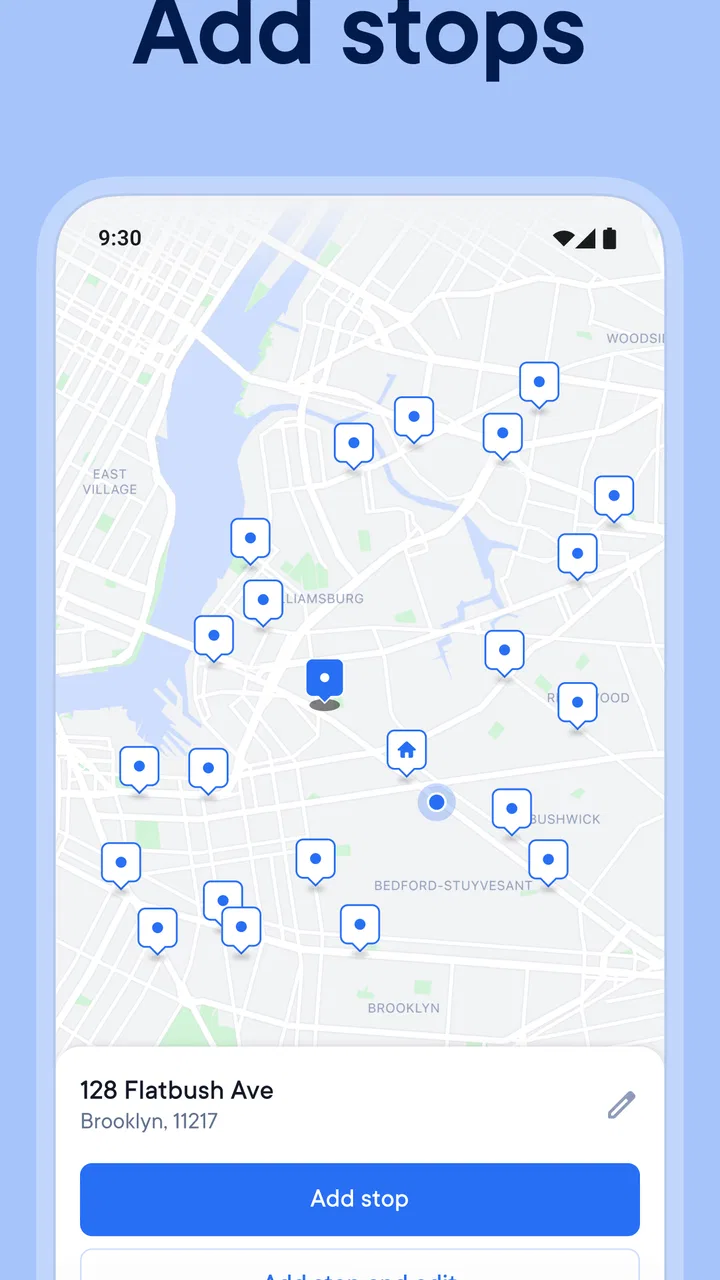
The central idea is straightforward: enter several destinations, let the app help arrange them, and then follow the resulting plan while completing the route. That sounds like a small difference from Google Maps or Apple Maps, but it changes the kind of task the app is designed to solve. Traditional navigation apps are excellent companions for individual journeys. Spoke is more useful when the journey is a chain of stops and the order matters.
You May Also Like

 Blood Strike: 2.5 Anniversary
Blood Strike’s Loadouts Turn Every Drop Into a Tactical Gamble
A close look at Blood Strike’s custom loadouts: how fast access to signature weapons reshapes its battle royale rhythm, rewards preparation, and narrows the gap between fights.

 Pandora - Music & Podcasts
Pandora’s Music Is Easy to Start, but Harder to Recover
Pandora’s strength is its low-effort path from a seed to a station. Its weak spot is how much confidence it asks you to place in connection, setup, and quiet recovery.

 8 Ball Pool
 Is Built on Rivalries, Rematches, and Routine
A close look at the rivalries, rematches, shared routines, and unanswered safety questions that turn a quick pool match into a persistent mobile community.

 Samsung Music
’s Quiet Strength Is Playing What You Already Own
Its reach comes less from spectacle than from dependable access to a personal library. That simplicity is both the app’s strongest retention engine and its ceiling.

 AccuWeather: Weather Radar
AccuWeather Review: A Quick, Clear Forecast for Everyday Decisions
For everyday plans, the best forecast is the one you can understand quickly. AccuWeather makes rain timing, radar, and local conditions easy to act on, with a few trade-offs.

 Hill Climb Racing
Why Hill Climb Racing Still Turns Crashes Into One More Run
A tiny car, a bumpy hill and one more upgrade: Hill Climb Racing keeps resurfacing because its simple chaos makes every near-miss feel personal.
More From Our News Desk



I would describe it as a planning layer that sits between a list of addresses and turn-by-turn navigation. Instead of making me decide the next stop from scratch every time I finish one, it gives the day a structure. That is particularly practical for delivery work, service calls, property visits, errands across a large area, or any schedule where returning to the same neighborhood twice feels wasteful.
The former name, Circuit, is worth knowing because some people may still recognize the app or older references by that name. The current store short description identifies it as Spoke Route Planner, while the longer summary emphasizes route optimization and completing work faster. In everyday use, the important point is not the branding change; it is that this is aimed at organizing a route with multiple destinations rather than replacing every map feature on your phone.
What the free access means in practice
The app is free, which makes it easy to test before committing to a workflow. That is a meaningful advantage for occasional users. If I only need help arranging a particularly busy day once in a while, I can try the planning process without treating the app as an immediate purchase. It also lowers the barrier for a small operator or independent worker who wants to see whether route planning saves enough time to justify changing habits.
There are in-app purchases ranging from $1.49 to $209.99 per item. That broad range tells me that the free entry point and the paid value should be considered separately. The free installation is useful for evaluating the experience, but I would not assume that every advanced capability or long-term workflow is included without checking the purchase screen for the exact plan being offered on the device. The sensible approach is to start with a real route, measure whether the organization helps, and only then decide whether a paid option makes financial sense.
For a professional driver, the right question is not simply whether the app costs money. It is whether the time saved, reduced backtracking, and easier planning are worth the specific purchase. Someone completing many stops every working day can judge that fairly quickly. Someone making a handful of personal errands each month may receive enough value from free access and have little reason to pay for more.
A realistic day with the planner
Imagine a technician beginning the morning with appointments scattered across several neighborhoods. The first instinct might be to open a familiar map, choose the nearest-looking destination, and repeat that process throughout the day. That can create a route that feels locally sensible but becomes inefficient overall. A stop that looks close to the current location may leave the driver on the wrong side of town for the next appointment.
With Spoke, I would enter the full list before leaving, review the proposed order, and then check whether the sequence fits the day’s practical constraints. If one customer needs an early visit or one location has a promised time, that information should influence the plan rather than being treated as an afterthought. The benefit is not merely fewer taps while driving; it is making the important decisions while stationary, before small choices accumulate into a long detour.
A useful habit is to treat the generated order as a starting point, not an unquestionable command. Route optimization works from the destinations and constraints it receives. It cannot know every temporary loading restriction, building entrance, personal preference, or customer who is likely to be unavailable unless the workflow accounts for those details. I would review the first route carefully, especially on a busy day, and then use the experience to improve how I prepare future stops.
Where it is stronger than ordinary map apps
The clearest strength is the shift from destination-by-destination navigation to whole-route thinking. A general-purpose map app usually asks where I want to go next. Spoke is built around the more demanding question of how a collection of stops should fit together. That distinction matters when the route contains enough destinations that mental planning becomes tiring or error-prone.
It can also reduce decision fatigue. When I am working through a list, repeatedly choosing the next stop is a surprisingly easy way to lose track of priorities. A planned sequence gives me a reference point and makes the day easier to manage. Even if I later adjust the order, I am editing a route rather than rebuilding one from nothing.
Another non-obvious benefit is that it encourages better preparation. I am more likely to notice incomplete addresses, duplicate destinations, or awkward timing before starting the drive when all stops are visible together. That is a different kind of efficiency from faster navigation: it prevents avoidable confusion before the vehicle moves.
For delivery and field-service users, this distinction can be more valuable than a collection of extra map layers. If the main problem is sequencing, a specialized planner may be more useful than a familiar app that has excellent maps but leaves the multi-stop logic to the driver.
Where familiar alternatives may be better
I would not replace a general map app with Spoke for every journey. If I am traveling to one unfamiliar address, looking for a business, checking public transport, exploring a neighborhood, or comparing nearby places, a standard navigation app is usually the more natural choice. Those apps are designed for discovery and broad navigation, while Spoke is more specialized.
The distinction also matters for people who prefer complete control. An optimized sequence may not match the order I personally want. I may need to collect a key from one location, avoid a particular road, meet someone at a fixed time, or group stops for reasons that are not obvious from distance alone. In those situations, an app that lets me manually build a route may feel more comfortable, even if it requires more planning.
There is a trade-off between automation and inspection. The more I rely on an automatically arranged route, the more important it becomes to review the result. A route can be mathematically tidy and still awkward in real life because of parking, access, delivery windows, or the time needed at each stop. Spoke can organize the driving order, but I still need to apply human judgment to the working day.
Practical workflow tips that make a difference
My first tip is to prepare the route before driving, not while already moving between stops. Entering everything in advance exposes the shape of the day. It also makes it easier to spot a destination that is far outside the main cluster. That outlier may deserve special attention because it can affect the entire sequence more than several nearby stops.
Second, separate route logic from appointment logic. A short drive is not necessarily the best next stop if the appointment has a narrow time window. I would identify fixed commitments first, then use the planner to organize the flexible destinations around them. This prevents the common mistake of choosing the shortest-looking route while creating a scheduling problem later.
Third, keep a mental note of where the app’s recommendation differs from my own instinct. If it repeatedly places a destination in an order that seems surprising, that is useful feedback. Perhaps I am overlooking the overall geography, or perhaps a local restriction makes the recommendation unsuitable. Either way, reviewing those differences turns the app from a passive navigator into a planning aid that improves my own route judgment.
Fourth, use the first few routes as a trial period rather than judging the app from a single trip. A route planner becomes more valuable when it fits the way I actually collect addresses, handle changes, and complete stops. If the preparation process feels slower than simply using a map, that is important evidence too. The app should reduce the total burden, not merely move the work to a different screen.
Limitations I would consider before relying on it
The biggest limitation is specialization. Spoke is not the best answer to every navigation question, and its value depends heavily on having several destinations to organize. If my trips are mostly one destination at a time, the extra planning step may feel unnecessary. The app makes most sense when route order is a recurring problem rather than an occasional inconvenience.
There is also a human verification cost. I would not blindly follow any optimized order when the day involves strict appointments, unusual access arrangements, or destinations where parking is difficult. The app may help with the sequence, but I remain responsible for checking whether that sequence works operationally. For a professional driver, this review step is part of using the tool well, not a reason to ignore it.
Changes during the day can also test the workflow. A canceled stop, a new urgent visit, or an address correction can make the original plan less useful. The practical question is how quickly I can update the route and regain confidence in the order. This is one reason I would test the app with a normal working list before making it central to a time-sensitive operation.
Finally, the purchase structure deserves attention. Free access is attractive, but the presence of individual in-app purchase amounts from $1.49 up to $209.99 means that users should examine what they are actually selecting before paying. I would avoid treating the highest possible item as automatically necessary. The right value depends on how frequently I plan routes and whether the app solves a costly problem in my particular routine.
Who is likely to get the most value
Spoke is a strong candidate for couriers, independent delivery drivers, mobile technicians, cleaners, sales representatives, tradespeople, and anyone who visits multiple addresses in one shift. It is especially relevant when the driver receives a list of destinations rather than a single route from a dispatcher. The planning benefit grows as the number of stops and the cost of backtracking increase.
It can also help households with a complicated errand day, although casual users should keep the cost question in proportion. If I have several stores, a collection point, and a visit to a relative spread across town, a route planner can make the day calmer. But if that situation happens only a few times a year, a regular map app and a little manual planning may be enough.
People who should probably skip it are those looking mainly for local search, transit directions, cycling guidance, travel discovery, or a simple point-to-point navigator. Those needs do not naturally take advantage of Spoke’s main purpose. I would also hesitate to recommend making it the sole planning tool for a business until the user has tested it with real addresses, realistic timing, and the kinds of changes that happen during a normal shift.
My value judgment and final recommendation
I see the free installation as the app’s strongest invitation: it lets me test the central idea without paying first. The paid side requires a more personal calculation because the available purchase items cover a wide range, from $1.49 to $209.99. I would pay only after confirming that the route organization saves meaningful time or reduces enough stress to justify the chosen purchase.
For someone who regularly handles multiple stops, I would recommend trying it. The best reason is not a promise that every route will be perfect; it is that the app changes the planning task from repeated guesswork into a deliberate sequence. That can make a working day easier to start, easier to adjust, and easier to review afterward.
For occasional drivers, I would be more cautious. Spoke may be useful for an unusually busy day, but a familiar map app could remain the better everyday option because it is simpler for individual destinations and broader navigation needs. The specialized workflow only pays off when I actually have a multi-stop problem to solve.
Overall, I think Spoke Route Planner earns its place as a focused Maps & Navigation app. It is not a universal replacement for Google Maps, Apple Maps, or other general alternatives, and I would still check its proposed order against real appointment and access conditions. But when the challenge is arranging many destinations efficiently, the free trial path makes the decision easy: test it with a genuine route, inspect the result, and pay only if the improvement is real. That is a practical, balanced reason to give it a place on your phone.
FAQs for Spoke (Circuit) Route Planner
01What is Spoke (Circuit) Route Planner used for?
Spoke (Circuit) Route Planner is designed to optimize routes for delivery drivers, couriers, and anyone needing efficient route planning. It helps users save time and fuel by providing the most efficient paths, taking into account traffic conditions, distance, and delivery priorities. It’s ideal for improving productivity and reducing travel stress.
02Is Spoke (Circuit) Route Planner available for both Android and iOS?
Yes, the app is available for download on both Android and iOS platforms. Users can find it on the Google Play Store for Android devices and the Apple App Store for iOS devices. Ensure your device meets the minimum system requirements for optimal performance and user experience.
03Does Spoke (Circuit) Route Planner require an internet connection?
While initial setup and route calculations might require an internet connection, the app also offers offline functionalities. This means you can still access previously downloaded maps and routes even when you're out of network coverage, making it reliable for use in remote areas.
04Can I customize routes in Spoke (Circuit) Route Planner?
Yes, the app allows for route customization to suit specific needs. Users can add stops, set priorities for deliveries, and adjust routes based on real-time traffic updates. This flexibility ensures that the app can be tailored to meet individual or business requirements, maximizing efficiency.
05Are there any subscription fees for using Spoke (Circuit) Route Planner?
Spoke (Circuit) Route Planner offers both free and premium versions. The free version includes basic features, while the premium version provides advanced functionalities like unlimited stops, enhanced traffic data, and priority customer support. Users can choose the plan that best suits their needs.
Pros
- Intuitive interface for easy route planning.
- Real-time traffic updates enhance accuracy.
- Customizable routes for specific needs.
- Supports multiple stops for flexibility.
- Offline access to saved routes.
Cons
- Limited to certain geographic regions.
- Occasional glitches in route calculations.
- Requires premium for some advanced features.
- Battery-intensive with prolonged use.
- User interface can be cluttered at times.

Spoke (Circuit) Route Planner
Gallery